 Cento
CentoSplit the bill: who ate what, worked out in a minute
Splitting a restaurant bill with friends usually means a calculator, a long receipt and a few awkward messages the next day. How Split the bill in Cento divides a scanned receipt item by item, adds the tip and tells everyone what they owe.
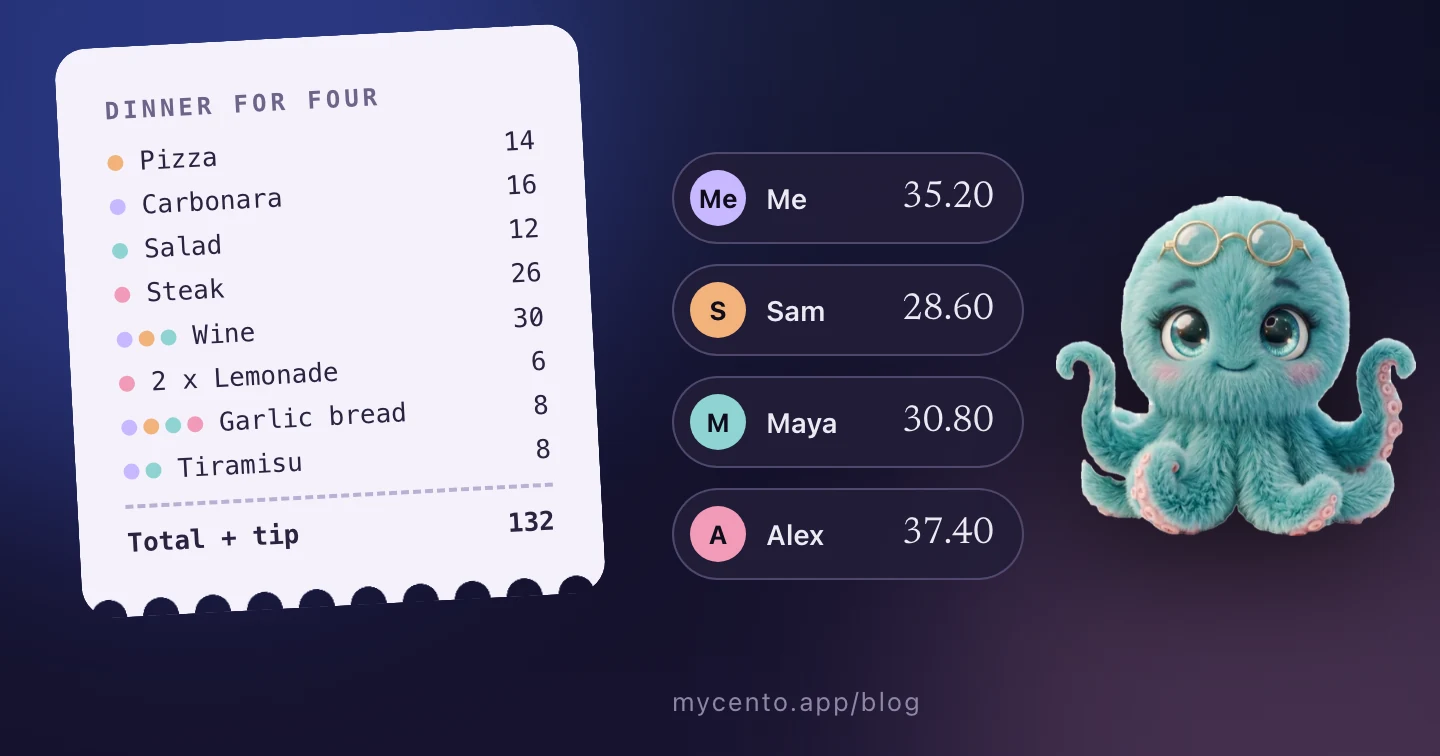
Eating out with friends is one of the nicest ways to spend an evening. Paying at the end is the part nobody enjoys. In this article I go through a dinner that ends the way many of them do, why the usual ways of splitting the bill go wrong, and how Split the bill in Cento works out who owes what from the receipt itself.
A dinner for four
Four friends go out for dinner: me, Sam, Maya and Alex. We order different things. Sam has a pizza, Maya a salad, Alex a steak and two lemonades, since Alex doesn’t drink, and I have the carbonara. Three of us share a bottle of wine, everyone eats from the garlic bread, and Maya and I share a tiramisu.
The bill comes to $120. I pay it with my card, because it’s faster than four cards at the till, and we add a 10% tip. Then the conversation starts.
Alex: Let’s just split it four ways. That’s $33 each.
Sam: I had a pizza and one glass of wine. Alex had the steak.
Alex: Fair. But I didn’t have any of the wine.
Maya: OK, so who had the lemonades? And the tiramisu was only the two of us, right?
Me: Give me a minute, I’ll work it out.
A few minutes later I’m still holding the receipt in one hand and the phone calculator in the other. The wine is $30 for three people, the garlic bread is $8 for four, and the tip should be on top of each share. The waiter comes back twice. In the end we round the numbers, and everyone feels a bit unsure about them.
The next day, in the group chat:
Sam: How much did I owe you from last night again?
Me: I think $29? Let me check the receipt.
Maya: I sent you $30, I rounded up :)
By then, the receipt is somewhere in my bag.
Why splitting the bill goes wrong
There are a few common ways to split a bill, and each one has the same weak spots.
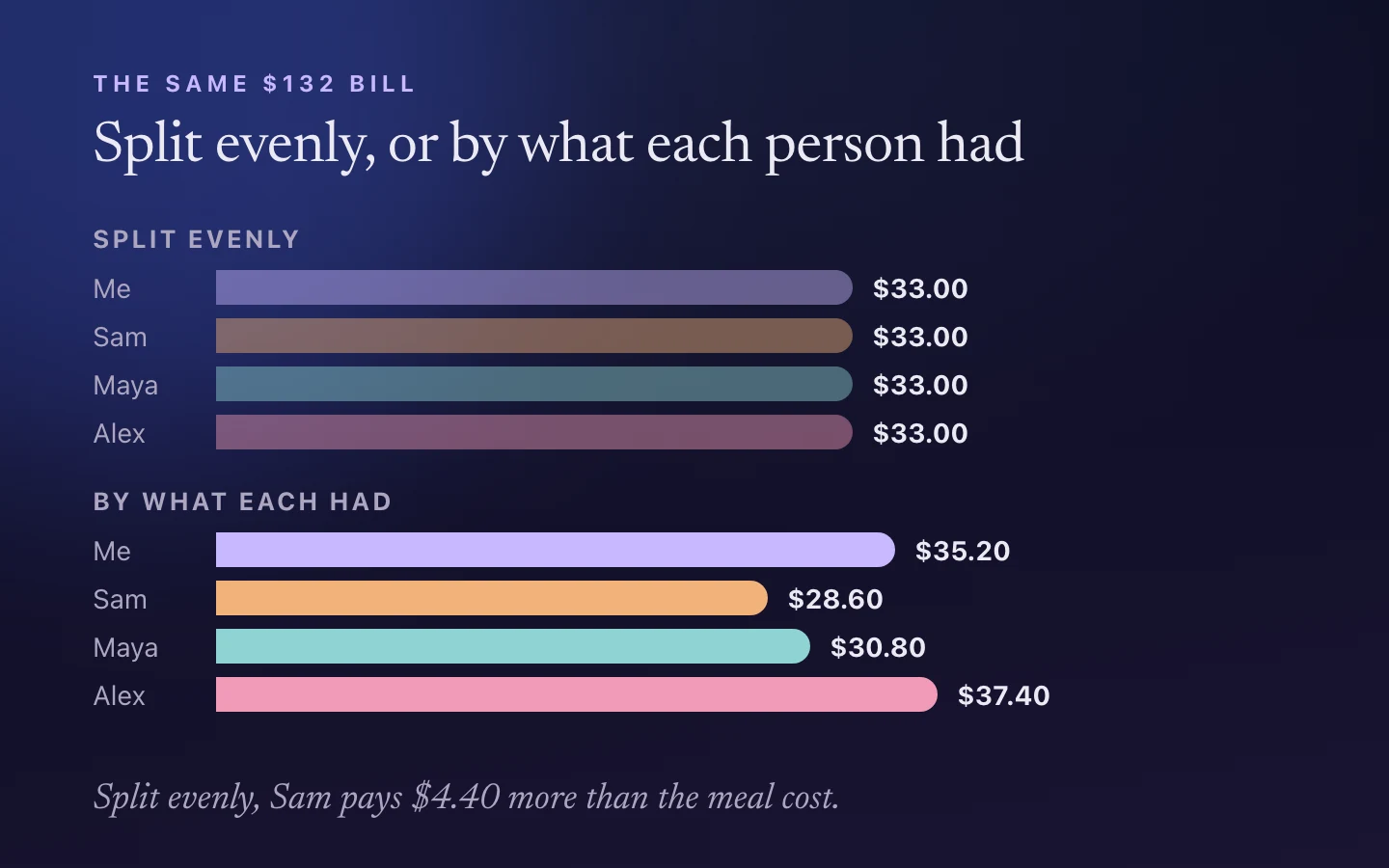
Splitting evenly is quick, but it’s only fair when everyone ordered about the same. At our dinner, Sam would pay $33 for a meal that cost $28.60, and Alex would pay $33 for one that cost $37.40.
Working it out by hand is fair, but slow. Shared items have to be divided between the right people, a line like “2 x lemonade” has to go to the person who had them, and the tip has to be added to every share. One mistake and the totals don’t add up to the bill.
Settling later means someone has to remember the numbers. The person who paid usually ends up reminding everyone, which nobody enjoys doing with friends.
The payer’s own budget is the last problem. If I log the whole $132 as my own expense, my month looks more expensive than it was. If I log nothing, my own $35.20 dinner disappears from my spending.
How Split the bill works in Cento
Split the bill starts from a receipt you scan in Cento. Cento reads every line of the receipt, with the item names, quantities and prices. On the scan screen, tap Split the bill and you go through three steps.
1. Table. Add the people at the table. You are already on the list as the person who paid. The others can be people from your Cento People list, or guests you type in for this one bill. Guests aren’t saved anywhere.
2. Assign. For each item on the receipt, tap the people who had it. If one person had it, it goes to them. If three people shared the wine, Cento divides it evenly between them, $10 each. For a line with several units, like “2 x lemonade”, you set how many each person had, and the price is divided by units.
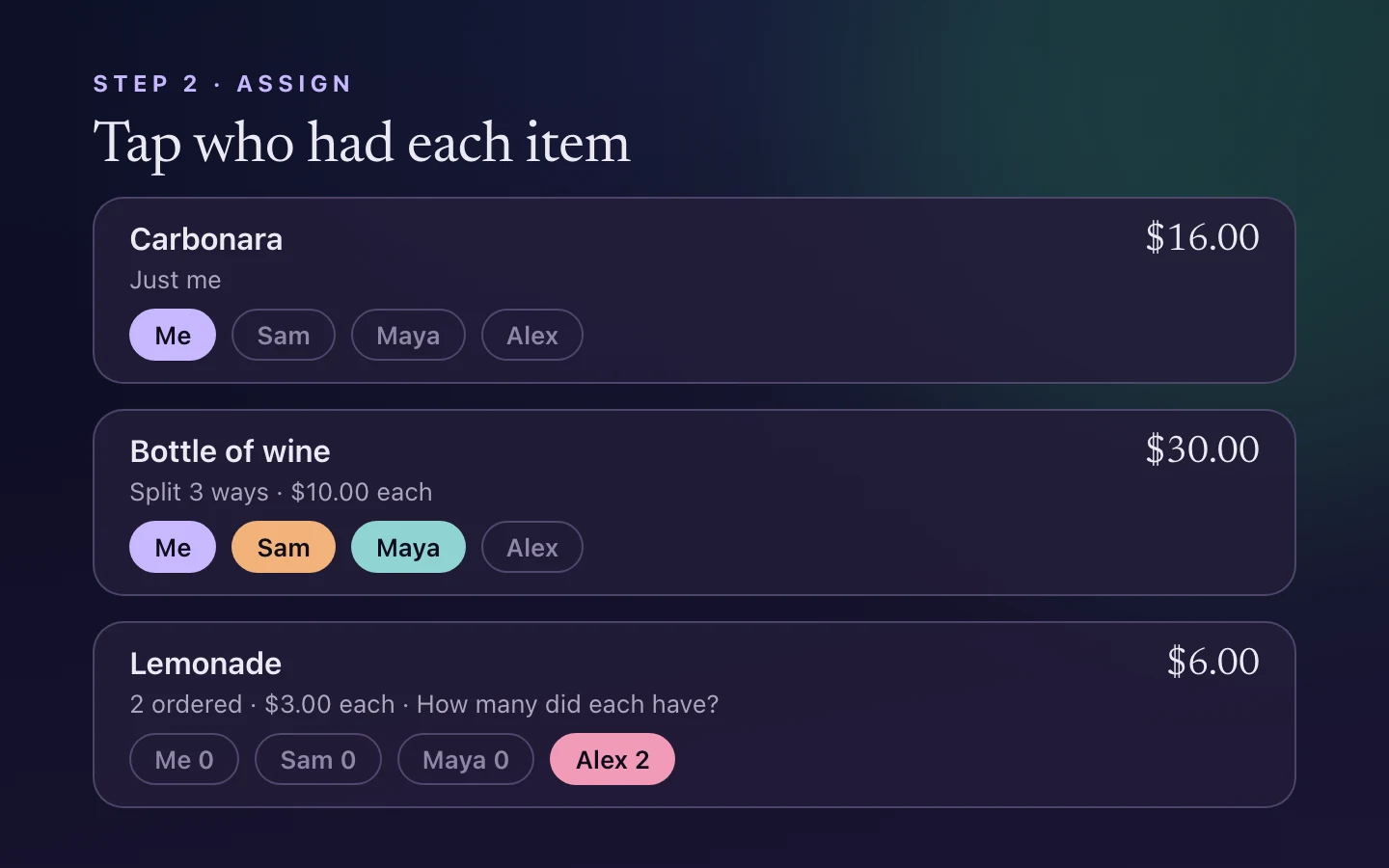
A running total at the bottom shows what each person owes so far, so you can see straight away if something was missed.
3. Settle. Add the tip as a percentage or as an amount, and choose how to divide it: by share, so everyone tips in proportion to what they had, or evenly. Cento then shows what each person owes, with the items behind every total. The amounts are calculated to the cent and always add up to the bill.
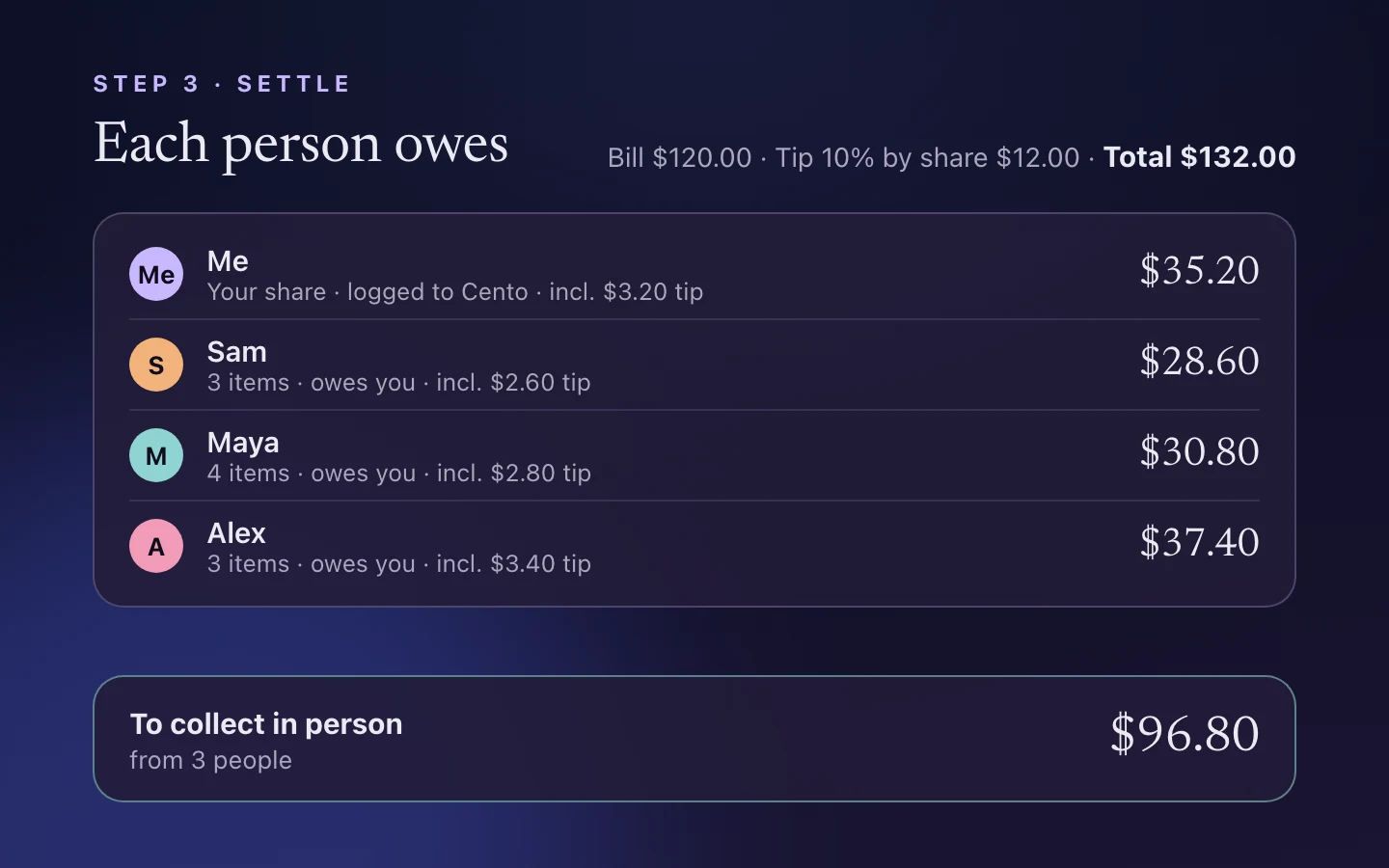
At our dinner, that’s $35.20 for me, $28.60 for Sam, $30.80 for Maya and $37.40 for Alex. I can read the numbers out at the table, and each person can see which items make up their total.
Only your share goes into your budget
When the split is done, Cento logs only your share as your expense. You see your lines first and can edit them before they’re saved. Each item you had becomes its own line at your share, under Restaurant, with your part of the tip. For me that’s the carbonara, a third of the wine, a quarter of the garlic bread and half of the tiramisu, plus $3.20 of tip: $35.20 in total.
The rest of the bill is money you get back. Cento shows it as the amount to collect from the others, $96.80 from 3 people in our example. That’s the number I need in the group chat the next day, and it’s still there after the paper receipt is gone.
What it saves
- Time at the table. A scan and a few taps replace the calculator and the receipt passed around the table.
- Small arguments. Everyone pays for what they had, and the breakdown shows each person’s items.
- Mistakes. Shared items, quantities and the tip are calculated for you, and the totals always match the bill.
- A correct budget. Your spending shows your own dinner, and the money your friends owe you stays separate from it.
Split the bill is part of Cento Premium, on both Android and iPhone. The people you split with don’t need Cento: only you scan the receipt, and they just need to know their total.
Next time the bill arrives, the person who paid can scan it, and everyone can get back to dessert :)